Capabilities & Usage
This action provides a comprehensive set of capabilities for building, inspecting, and packaging Splunk Apps/Add-ons in GitHub Actions workflows. All configuration details and workflow examples are included below.
Build Generation
The action automatically generates build artifacts from your GitHub repo.
- uses: VatsalJagani/splunk-app-action@v6
  with:
    app_dir: "my_app"
app_diris optional if you want to generate the build from the repo root.Supports multiple Apps/Add-ons in a single repository.
- uses: VatsalJagani/splunk-app-action@v6
  with:
    app_dir: "my_splunk_app"

- uses: VatsalJagani/splunk-app-action@v6
  with:
    app_dir: "my_splunk_add-on"
UCC Add-on Generator Support
Supports Add-on build with UCC Add-on Generator using the ucc-gen build command.
Reference: Splunk Add-on UCC Framework
The
app_dirfolder must have a sub-folder namedpackageand a file namedglobalConfig.jsonYou need to use
ucc-gen initcommand locally first to initialize the Add-on/Repository before using this actionBy default, this action does not remove files with mimetype
application/x-executableorapplication/x-sharedlibfrom generatedlib/output. Setis_remove_not_allowed_executables_from_lib: trueto enable stricter cleanup for AppInspect compliance. This also works with the Python Dependency Manager (python_requirements_file).
- uses: VatsalJagani/splunk-app-action@v6
  with:
    app_dir: "TA_my_addon"
    use_ucc_gen: true
    is_remove_not_allowed_executables_from_lib: true
Warning
You must run ucc-gen init locally first to set up the proper UCC structure before using this GitHub Action. See the UCC Framework documentation for details.
Important
Mutually Exclusive Feature: UCC-Gen cannot be used together with Python Dependency Manager (python_requirements_file). The workflow will fail if both features are enabled.
Python Dependency Manager
Manage Python dependencies for your Splunk Apps and Add-ons using a requirements.txt file. Dependencies are automatically installed at build time, keeping your repository clean and enabling automated dependency updates through GitHub Dependabot.
Key Benefits
✅ GitHub Dependabot Integration - Automatically receive pull requests for dependency updates
✅ Clean Repository - No third-party code committed to your repository
✅ Automatic Cleanup - Removes dangling code and cache files (
.pyc,__pycache__)✅ Build-Time Installation - Dependencies installed to
libfolder during build process✅ Easy Maintenance - Single file to manage all Python dependencies
Basic Usage
- uses: VatsalJagani/splunk-app-action@v6
  with:
    app_dir: "my_app"
    python_requirements_file: "lib/requirements.txt"  # Path relative to app_dir
    splunk_python_version: "3.9"  # Match your Splunk platform's Python version (default: 3.13)
Setup Instructions
Create a
requirements.txtfile in a subdirectory within your app (e.g.,lib/requirements.txt):requests==2.31.0 beautifulsoup4==4.12.2 lxml==4.9.3
Note: The path to requirements.txt should be relative to your app_dir. Dependencies will be installed in the same directory as the requirements file.
Add the action to your workflow with the
python_requirements_fileparameter:- uses: VatsalJagani/splunk-app-action@v6 with: app_dir: "my_splunk_app" python_requirements_file: "lib/requirements.txt" # Path relative to app_dir splunkbase_username: ${{ secrets.SPLUNKBASE_USERNAME }} splunkbase_password: ${{ secrets.SPLUNKBASE_PASSWORD }}
(Optional) Enable GitHub Dependabot for automatic dependency updates:
Step 3a: Add a
.python-versionfile to your app directory so Dependabot knows which Python version to target when evaluating compatible package versions:3.13This file should sit at the app root (e.g.,
my_splunk_app/.python-version). Without it, Dependabot may suggest versions incompatible with Splunk’s Python runtime — for example, proposingrequests==2.33.1which requires Python ≥3.10 and would fail at Splunk runtime.Step 3b: Add
.github/dependabot.yml, pointing the directory at your app root so Dependabot discovers both the.python-versionfile and yourrequirements.txt:version: 2 updates: - package-ecosystem: "pip" directory: "/my_splunk_app" # App root — Dependabot discovers requirements.txt recursively schedule: interval: "weekly"
Important
Always point Dependabot’s
directoryto the app root (not thelib/subdirectory). This ensures Dependabot reads the.python-versionfile and constrains its suggestions to packages compatible with your Splunk platform’s Python version.
Advanced Configuration
You can specify a different requirements file path (always relative to app_dir):
- uses: VatsalJagani/splunk-app-action@v6
  with:
    app_dir: "my_app"
    python_requirements_file: "dependencies/production.txt"  # Dependencies installed to dependencies/
Note: Dependencies will be installed in the same directory as the requirements file. For example:
lib/requirements.txt→ installs tolib/dependencies/requirements.txt→ installs todependencies/requirements.txt→ installs tolib/(creates lib subdirectory automatically)
How It Works
The action copies your app directory to a temporary build location
Determines the target directory from the requirements file path (e.g.,
lib/requirements.txt→ target islib/)Cleans the target directory (removes all existing files)
Runs
uv pip install --python <splunk_python_version> -r requirements.txt --target <target_directory>to install dependencies compatible with your Splunk platform’s Python version (default:3.13)Cleans up
.pycfiles and__pycache__directoriesRemoves requirements.txt file from the build
Proceeds with normal build generation
Path Handling:
The
python_requirements_filepath is relative to app_dirDependencies are installed in the same directory as the requirements file
If requirements.txt is in the app root, a
lib/subdirectory is automatically created.
The target folder is automatically added to Python’s import path in Splunk, so your scripts can import the dependencies normally:
import requests
from bs4 import BeautifulSoup
Note
Cleanup Behavior:
The directory containing requirements.txt will be cleaned before installing dependencies
The requirements.txt file will be removed from the final build package
The
.python-versionfile will be automatically removed from the final build package (safe to commit to your app directory for Dependabot)The
uv-specific.lockfile is removed from the dependency target directoryThe
bin/directory at the target root is removed if it contains only console entry point scripts (shebang#!files created byuvfor packages withconsole_scriptsentry points). If any non-script file, subdirectory, or symlink/special file is found insidebin/, the directory is preserved and a warning is loggedThis ensures a clean build without any leftover files or dependencies
Important Notes
Important
Mutually Exclusive Feature: Python Dependency Manager cannot be used together with UCC-Gen (use_ucc_gen: true). The workflow will fail with a clear error message if both features are enabled.
Tip
Installing Splunk Python SDK:
You can install the Splunk Python SDK via the Python Dependency Manager by adding splunk-sdk to your requirements.txt:
splunk-sdk==2.1.1
This provides the same functionality with the added benefits of Dependabot integration and version control.
```{note}
The `lib` folder is automatically added to Python's import path in Splunk, so your scripts can import the dependencies normally:
```python
import requests
from bs4 import BeautifulSoup
# Or use Splunk SDK
import splunklib.client as client
File and Folder Permission Management
Avoid File and Folder Permission Issues
Danger
IMPORTANT: This might break your App if you have executable files other than .sh and .exe.
Avoid this parameter if your App has executable files other than
.shand.exeLinux executables are generally without extension - avoid this parameter in that case
Alternatively, use the “User Defined Commands” section below to assign proper permissions manually
You can add to_make_permission_changes: true to automatically fix file and folder permission issues for Splunk App Inspect:
- uses: VatsalJagani/splunk-app-action@v6
  with:
    app_dir: "my_app"
    to_make_permission_changes: true
    splunkbase_username: ${{ secrets.SPLUNKBASE_USERNAME }}
    splunkbase_password: ${{ secrets.SPLUNKBASE_PASSWORD }}
This runs the following commands automatically:
find my_app -type f -exec chmod 644 '{}' \;
find my_app -type f -name '*.sh' -exec chmod 755 '{}' \;
find my_app -type f -name '*.exe' -exec chmod 755 '{}' \;
find my_app -type f -name '*.bat' -exec chmod 755 '{}' \;
find my_app -type f -name '*.msi' -exec chmod 755 '{}' \;
find my_app -type f -name '*.cmd' -exec chmod 755 '{}' \;
find my_app -type d -exec chmod 755 '{}' \;
Running User Defined Commands
Note
Commands run in the context of your App’s root directory (not the repo’s root directory).
Run custom Linux commands before generating the App build by setting environment variables SPLUNK_APP_ACTION_<n>:
- uses: VatsalJagani/splunk-app-action@v6
  env:
    SPLUNK_APP_ACTION_1: "find . -type f -exec chmod 644 '{}' \\;"
    SPLUNK_APP_ACTION_2: "find . -type f -name '*.sh' -exec chmod +x '{}' \\;"
    SPLUNK_APP_ACTION_3: "find . -type d -exec chmod 755 '{}' \\;"
  with:
    app_dir: "my_app"
Key Features:
Commands run in your App’s root directory context
Maximum 99 commands supported (
SPLUNK_APP_ACTION_1toSPLUNK_APP_ACTION_99)Commands execute in incremental order
Useful for removing unwanted files, changing permissions, or preprocessing
Example - Remove test files:
- uses: VatsalJagani/splunk-app-action@v6
  env:
    SPLUNK_APP_ACTION_1: "rm -rf extra_test_folder"
    SPLUNK_APP_ACTION_2: "rm -rf tests/"
  with:
    app_dir: "my_app"
If your app has executable files other than .sh, avoid enabling to_make_permission_changes.
You can use user-defined commands to set permissions as required.
- uses: VatsalJagani/splunk-app-action@v6
  with:
    app_dir: "my_app"
    to_make_permission_changes: true
    splunkbase_username: ${{ secrets.SPLUNKBASE_USERNAME }}
    splunkbase_password: ${{ secrets.SPLUNKBASE_PASSWORD }}
Example shell commands used:
find my_app -type f -exec chmod 644 '{}' \;
find my_app -type f -name '*.sh' -exec chmod 755 '{}' \;
find my_app -type d -exec chmod 755 '{}' \;
App-Inspect & Cloud Checks
The action runs comprehensive app-inspect checks using either the Splunkbase API (recommended) or local validation with the splunk-appinspect Python library.
GitHub Annotations & Job Summary
AppInspect results are published as inline GitHub annotations and comprehensive job summaries for immediate feedback in Pull Requests.
GitHub Annotations
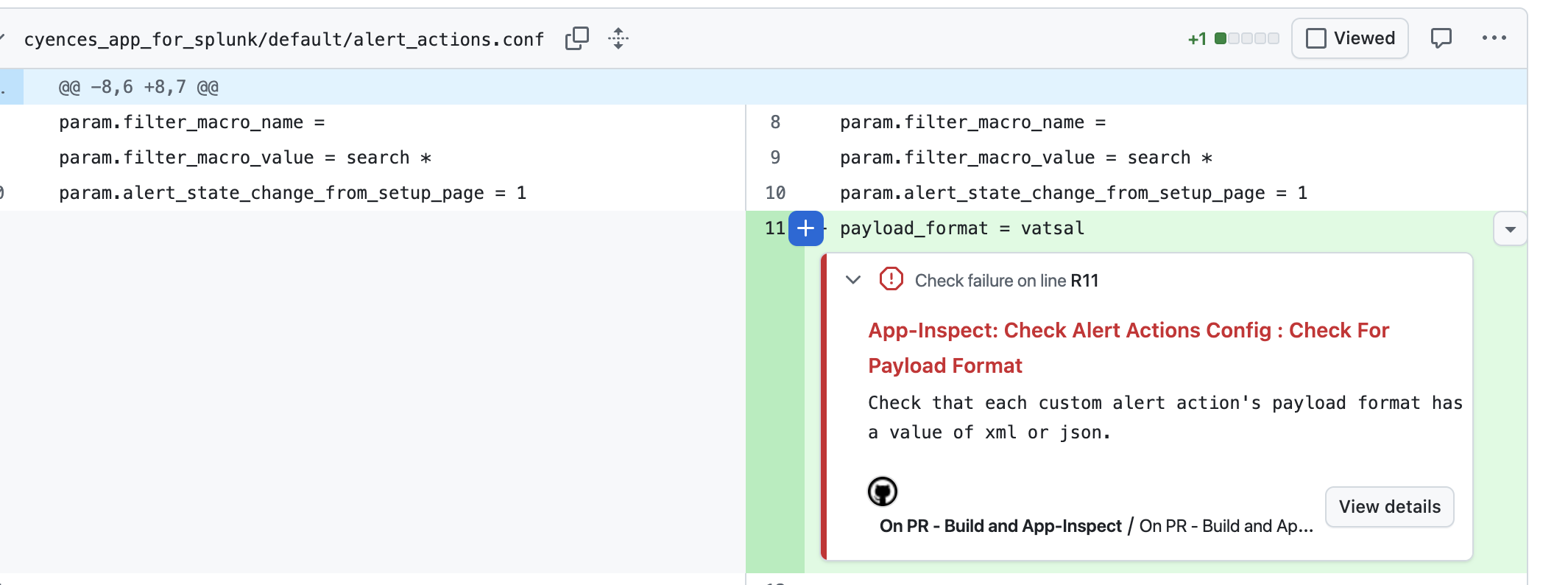
App-inspect failures and errors appear as inline annotations on PR files
Warnings appear as warning annotations
No special permissions required - annotations work out of the box
Click on annotations to see file location, line number, and detailed error messages
Annotation titles include check group and name for easy identification (e.g., “App-Inspect: Check Alert Actions Config : Check For Payload Format”)
Automatically published for app-inspect only (not for cloud-inspect or ssai-inspect)
GitHub Job Summary
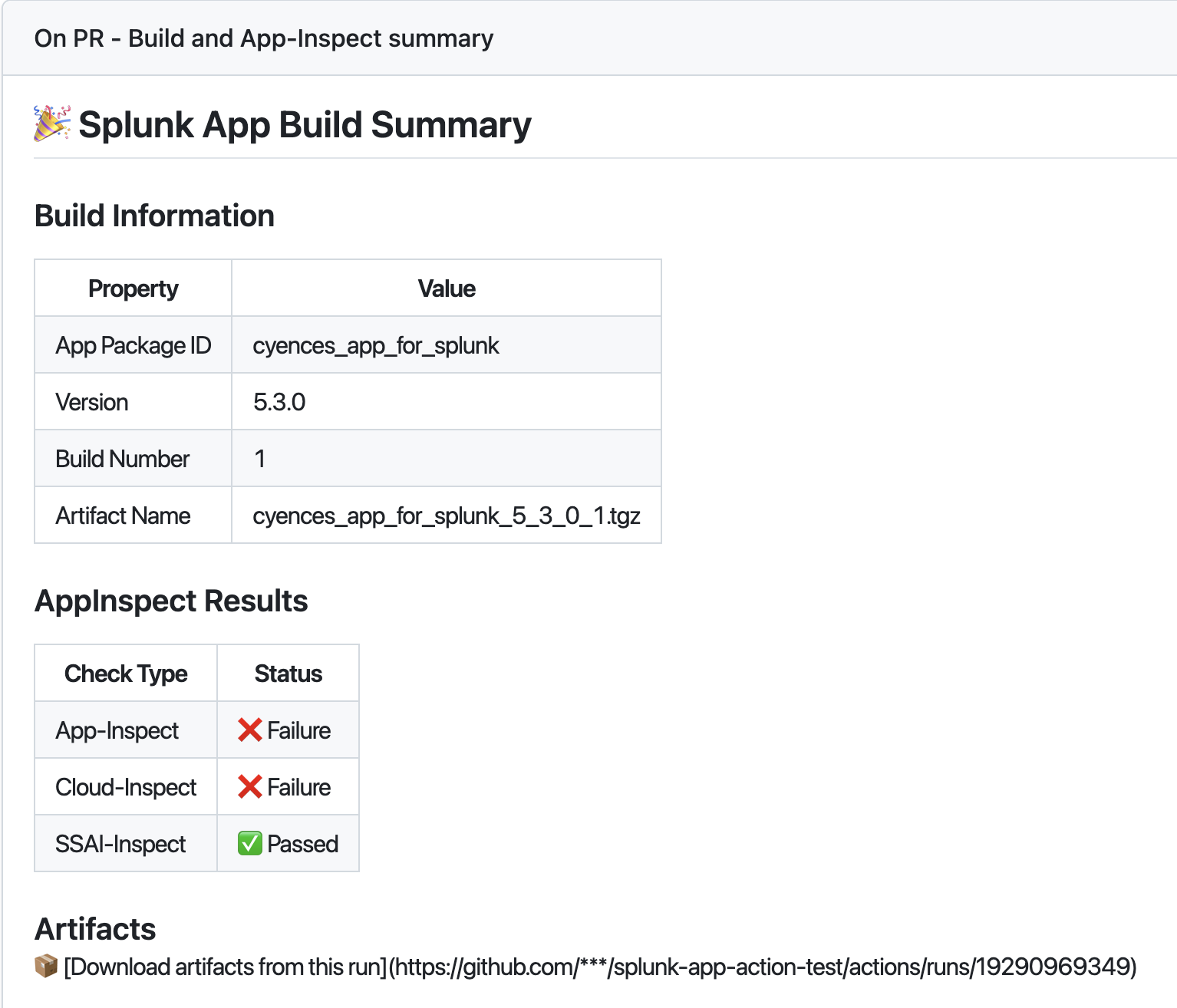
Comprehensive build summary displayed in the Actions UI
Shows app metadata (package ID, version, build number, and artifact name)
Displays AppInspect results for all check types (app-inspect, cloud-inspect, ssai-inspect)
Includes status indicators with emojis for quick visual feedback
Provides direct links to download artifacts
Automatically generated for every workflow run
Failure Control
Control when the workflow fails based on AppInspect results:
- uses: VatsalJagani/splunk-app-action@v6
  with:
    app_dir: "my_app"
    local_app_inspect: true
    fail_on: "errors"  # Options: errors (default), warnings, none
"errors"- Fail only on errors and failures (default)"warnings"- Fail on warnings, errors, or failures (strict mode)"none"- Never fail, useful for informational checks during development
Splunkbase API (Recommended)
The Splunkbase API provides the most accurate and up-to-date validation as it’s the same system used when submitting apps to Splunkbase.
Why Splunkbase API?
Note
We recommend the Splunkbase API because:
CLI versions are often outdated compared to the Splunkbase API
You would fail checks when uploading to Splunkbase if using outdated CLI tools
This provides the same validation as the actual Splunkbase submission process
Features:
App-Inspect checks - Core Splunk app validation
Cloud-Inspect checks - Splunk Cloud compatibility validation
SSAI checks - Splunk Security Analytics Integration validation
HTML reports generated as GitHub artifacts (available in Actions tab)
Workflow failure on any inspect errors or failures
Requirements:
splunkbase_username: Your Splunkbase account usernamesplunkbase_password: Your Splunkbase account password (use GitHub secrets!)
- uses: VatsalJagani/splunk-app-action@v6
  with:
    app_dir: "my_app"
    splunkbase_username: ${{ secrets.SPLUNKBASE_USERNAME }}
    splunkbase_password: ${{ secrets.SPLUNKBASE_PASSWORD }}
Local App Inspect (Faster Alternative)
For faster validation during development, you can use local app inspect with the splunk-appinspect Python library. This doesn’t require Splunkbase credentials.
Warning
Local app inspect may not be as up-to-date as the Splunkbase API. For production releases, we recommend using the Splunkbase API to ensure your app will pass validation when submitting to Splunkbase.
Features:
Faster validation - No API calls, runs locally
No credentials required - Doesn’t need Splunkbase username/password
Same check types - Supports app-inspect, cloud-inspect, and SSAI checks
JSON and HTML reports generated as GitHub artifacts
- uses: VatsalJagani/splunk-app-action@v6
  with:
    app_dir: "my_app"
    local_app_inspect: true
Disable App Inspect (Optional):
You can use this for PRs and other than default branch if you don’t want Splunkbase AppInspect checks to run on all changes.
- uses: VatsalJagani/splunk-app-action@v6
  with:
    app_dir: "my_app"
    is_app_inspect_check: false
Utilities
The action provides several utilities that automatically enhance your Splunk Apps and Add-ons by adding common functionality and keeping dependencies updated.
Important
Automatic Pull Requests: Utilities make code changes and create pull requests for you to review and merge.
Each utility creates PRs with descriptive titles (e.g., “Added/Updated Logger Utility via splunk-app-action”) making it easy to identify which utility made changes.
Required Permissions
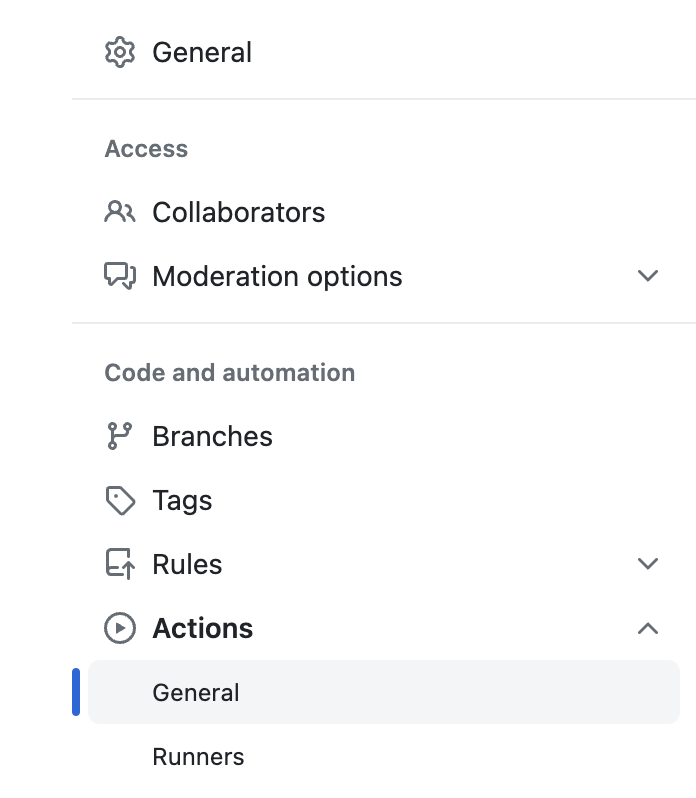
Go to your Repository
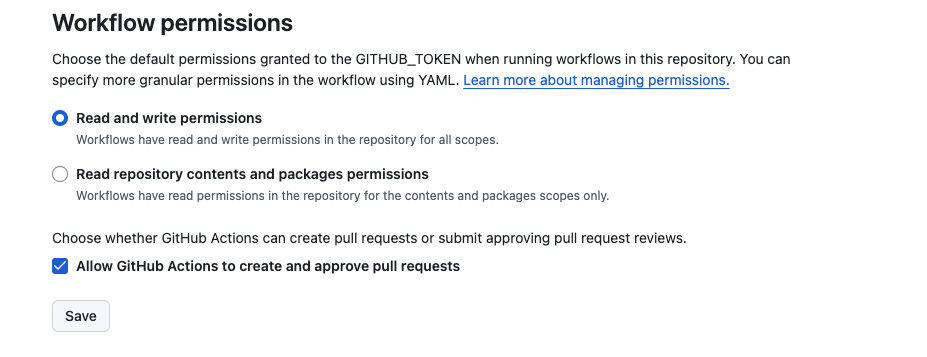
Settings>Actions>GeneralScroll down to Workflow permissions section
Select Read and write permissions
Make sure Allow GitHub Actions to create and approve pull requests is checked
Available Utilities:
whats_in_the_app- Adds information about your app (dashboards, alerts, etc.) to README.mdlogger- Adds Python logger manager with proper configurationcommon_js_utilities- Adds common JavaScript utilities for Splunk appsucc_additional_packaging- Helper for UCC Add-on input handler generation
You can use multiple utilities at once:
permissions:
  contents: write
  pull-requests: write

jobs:
  build:
    runs-on: ubuntu-latest
    steps:
      - uses: VatsalJagani/splunk-app-action@v6
        with:
          app_dir: "my_app"
          app_utilities: "whats_in_the_app,logger"
whats_in_the_app - Auto-Generate App Information
Automatically adds information about your app to the README.md file, including:
Number of dashboards, alerts, saved searches
Data inputs and other components
Helps users understand what’s inside your app
permissions:
  contents: write
  pull-requests: write

jobs:
  build:
    runs-on: ubuntu-latest
    steps:
      - uses: VatsalJagani/splunk-app-action@v6
        with:
          app_dir: "my_app"
          app_utilities: "whats_in_the_app"
logger - Python Logger Setup
Adds a complete Python logging solution including:
Logger manager Python file
props.confconfiguration for proper sourcetype assignmentInternal log file handling
permissions:
  contents: write
  pull-requests: write

jobs:
  build:
    runs-on: ubuntu-latest
    steps:
      - uses: VatsalJagani/splunk-app-action@v6
        with:
          app_dir: "my_app"
          app_utilities: "logger"
          logger_log_files_prefix: "my_app"
          logger_sourcetype: "my_app:logs"
Required Parameters:
logger_log_files_prefix: Prefix for your log fileslogger_sourcetype: Sourcetype for internal app logs (not required but recommended)
common_js_utilities - JavaScript Utilities
Adds a JavaScript file with commonly used functionality for Splunk App development:
Common JavaScript utilities and helper functions
Ready-to-use code for typical Splunk app needs
- uses: VatsalJagani/splunk-app-action@v6
  with:
    app_dir: "my_app"
    app_utilities: "common_js_utilities"
UCC Additional Packaging Utility
This utility adds additional_packaging.py for UCC-built Add-ons, helping generate input handler files for Splunk modular inputs.
Example Usage
- uses: VatsalJagani/splunk-app-action@v6
  with:
    app_dir: "."
    use_ucc_gen: true
    app_utilities: "ucc_additional_packaging"
The input handler file <Input_Name>_handler.py will start with:
from splunklib import modularinput as smi

def validate_input(session_key: str, input_script: smi.Script, definition: smi.ValidationDefinition):
        return

def stream_events(session_key: str, input_script: smi.Script, inputs: smi.InputDefinition, event_writer: smi.EventWriter):
        return
Update
validate_inputandstream_eventsas needed.validate_inputis optional;stream_eventsis required for event ingestion.