Examples & Usage Scenarios
This page provides comprehensive examples for different use cases of the splunk-app-action.
Basic Examples
Simple App Build
Basic build generation for a single app:
name: Build My Splunk App
on: [push]

jobs:
  build:
    runs-on: ubuntu-latest
    steps:
      - uses: actions/checkout@v5
      - uses: VatsalJagani/splunk-app-action@v6
        with:
          app_dir: "my_app"
Build with App-Inspect
Include Splunkbase app-inspect checks:
name: Build and Inspect
on: [push]

jobs:
  build:
    runs-on: ubuntu-latest
    steps:
      - uses: actions/checkout@v5
      - uses: VatsalJagani/splunk-app-action@v6
        with:
          app_dir: "my_app"
          splunkbase_username: ${{ secrets.SPLUNKBASE_USERNAME }}
          splunkbase_password: ${{ secrets.SPLUNKBASE_PASSWORD }}
Build with Local App-Inspect
Use local validation for faster feedback during development:
name: Build with Local Inspect
on: [push]

jobs:
  build:
    runs-on: ubuntu-latest
    steps:
      - uses: actions/checkout@v5
      - uses: VatsalJagani/splunk-app-action@v6
        with:
          app_dir: "my_app"
          local_app_inspect: true
Informational AppInspect (Never Fail)
Run AppInspect checks without failing the workflow:
name: Informational Inspect
on: [push]

jobs:
  build:
    runs-on: ubuntu-latest
    steps:
      - uses: actions/checkout@v5
      - uses: VatsalJagani/splunk-app-action@v6
        with:
          app_dir: "my_app"
          local_app_inspect: true
          fail_on: "none"  # Never fail based on AppInspect results
Fail on Warnings
Enforce strict quality standards by failing on warnings:
name: Strict Quality Check
on: [pull_request]

jobs:
  build:
    runs-on: ubuntu-latest
    steps:
      - uses: actions/checkout@v5
      - uses: VatsalJagani/splunk-app-action@v6
        with:
          app_dir: "my_app"
          local_app_inspect: true
          fail_on: "warnings"  # Fail on warnings or errors
Multi-App Repository
Build multiple apps from a single repository:
name: Multi-App Build
on: [push]

jobs:
  build:
    runs-on: ubuntu-latest
    strategy:
      matrix:
        app: ["my_splunk_app", "my_splunk_addon", "another_app"]
    steps:
      - uses: actions/checkout@v5
      - uses: VatsalJagani/splunk-app-action@v6
        with:
          app_dir: ${{ matrix.app }}
          splunkbase_username: ${{ secrets.SPLUNKBASE_USERNAME }}
          splunkbase_password: ${{ secrets.SPLUNKBASE_PASSWORD }}
UCC Add-on Examples
Basic UCC Build
name: UCC Add-on Build
on: [push]

jobs:
  build:
    runs-on: ubuntu-latest
    steps:
      - uses: actions/checkout@v5
      - uses: VatsalJagani/splunk-app-action@v6
        with:
          app_dir: "TA_my_addon"
          use_ucc_gen: true
          splunkbase_username: ${{ secrets.SPLUNKBASE_USERNAME }}
          splunkbase_password: ${{ secrets.SPLUNKBASE_PASSWORD }}
UCC with Additional Packaging Utility
name: UCC with Utilities
on: [push]

jobs:
  build:
    runs-on: ubuntu-latest
    permissions:
      contents: write
      pull-requests: write
    steps:
      - uses: actions/checkout@v5
      - uses: VatsalJagani/splunk-app-action@v6
        with:
          app_dir: "."
          use_ucc_gen: true
          app_utilities: "ucc_additional_packaging"
          splunkbase_username: ${{ secrets.SPLUNKBASE_USERNAME }}
          splunkbase_password: ${{ secrets.SPLUNKBASE_PASSWORD }}
Python Dependency Management Examples
Note
Important Behavior:
The
python_requirements_filepath is relative to app_dirDependencies are installed in the same directory as the requirements file
The directory containing requirements.txt will be cleaned before installation
The requirements.txt file is removed from the final build package
Install Splunk Python SDK by adding
splunk-sdkto requirements.txtUse
splunk_python_versionto match the Python version of your Splunk platform (default:"3.13")
Basic Python Dependencies
name: Build with Python Dependencies
on: [push]

jobs:
  build:
    runs-on: ubuntu-latest
    steps:
      - uses: actions/checkout@v5
      - uses: VatsalJagani/splunk-app-action@v6
        with:
          app_dir: "my_app"
          python_requirements_file: "lib/requirements.txt"  # Path relative to app_dir
          splunkbase_username: ${{ secrets.SPLUNKBASE_USERNAME }}
          splunkbase_password: ${{ secrets.SPLUNKBASE_PASSWORD }}
With GitHub Dependabot
Dependabot can automatically open PRs when newer versions of your dependencies are available. To ensure it only suggests versions compatible with Splunk’s Python runtime, two files are required.
1. Add .python-version to your app directory (e.g., my_app/.python-version):
3.13
This tells Dependabot which Python version to use when resolving compatible package versions. Without it, Dependabot may suggest packages that require a newer Python and fail at Splunk runtime (e.g., requests==2.33.1 requires Python ≥3.10).
The action automatically removes .python-version from the final build, so it is safe to commit it inside your app directory.
2. Add .github/dependabot.yml, pointing directory at the app root so Dependabot picks up the .python-version file:
version: 2
updates:
  - package-ecosystem: "pip"
    directory: "/my_app"  # App root — not lib/ — so Dependabot reads .python-version
    schedule:
      interval: "weekly"
    open-pull-requests-limit: 10
3. Use the action as normal:
name: Build with Managed Dependencies
on: [push, pull_request]

jobs:
  build:
    runs-on: ubuntu-latest
    steps:
      - uses: actions/checkout@v5
      - uses: VatsalJagani/splunk-app-action@v6
        with:
          app_dir: "my_app"
          python_requirements_file: "lib/requirements.txt"  # Path relative to app_dir
          splunk_python_version: "3.9"  # Should match .python-version
          splunkbase_username: ${{ secrets.SPLUNKBASE_USERNAME }}
          splunkbase_password: ${{ secrets.SPLUNKBASE_PASSWORD }}
Tip: Keep
splunk_python_versionin the action and the value in.python-versionin sync. Both serve the same purpose — one constrains Dependabot suggestions, the other constrains what gets installed into the build.
UCC Add-on with GitHub Dependabot
UCC add-ons require a different file layout because requirements.txt lives inside package/lib/ (generated by ucc-gen), which is two levels deep from the app root. Dependabot only scans one level deep, so the directory must point at package/ directly. The .python-version file must also live inside package/ so Dependabot finds it in the same scan.
Repository structure:
my-splunk-repo/
├── .github/
│   ├── dependabot.yml
│   └── workflows/
│       └── on_main.yml
└── TA_my_addon/               # app_dir: "TA_my_addon"
    ├── globalConfig.json
    └── package/
        ├── .python-version    # <-- here, NOT in TA_my_addon/
        └── lib/
            └── requirements.txt
1. Add .python-version inside package/ (e.g., TA_my_addon/package/.python-version):
3.13
2. Add .github/dependabot.yml, pointing directory at package/ so Dependabot finds both lib/requirements.txt (one level deep) and .python-version:
version: 2
updates:
  - package-ecosystem: "pip"
    directory: "/TA_my_addon/package"  # package/ dir — lib/requirements.txt is one level deep from here
    schedule:
      interval: "weekly"
    groups:
      python-dependencies:
        patterns:
          - "*"
3. Workflow — use_ucc_gen: true does not use python_requirements_file:
name: Build UCC Add-on
on:
  push:
    branches: [main, develop]

jobs:
  build:
    runs-on: ubuntu-latest
    steps:
      - uses: VatsalJagani/splunk-app-action@v6
        with:
          app_dir: "TA_my_addon"
          use_ucc_gen: true
          splunkbase_username: ${{ secrets.SPLUNKBASE_USERNAME }}
          splunkbase_password: ${{ secrets.SPLUNKBASE_PASSWORD }}
Why
package/and not the app root? Dependabot scans exactly one level deep. From the app root,lib/requirements.txtis at depth 2 (package/lib/), which Dependabot cannot reach. Pointing atpackage/putslib/requirements.txtat depth 1 and.python-versionat depth 0 — both reachable.
Custom Requirements Path
Dependencies will be installed in the same directory as the requirements file:
name: Build with Custom Requirements
on: [push]

jobs:
  build:
    runs-on: ubuntu-latest
    steps:
      - uses: actions/checkout@v5
      - uses: VatsalJagani/splunk-app-action@v6
        with:
          app_dir: "my_app"
          python_requirements_file: "dependencies/production.txt"  # Installs to dependencies/
          splunkbase_username: ${{ secrets.SPLUNKBASE_USERNAME }}
          splunkbase_password: ${{ secrets.SPLUNKBASE_PASSWORD }}
File Permission Examples
Automatic Permission Fixes
name: Build with Auto Permissions
on: [push]

jobs:
  build:
    runs-on: ubuntu-latest
    steps:
      - uses: actions/checkout@v5
      - uses: VatsalJagani/splunk-app-action@v6
        with:
          app_dir: "my_app"
          to_make_permission_changes: true
          splunkbase_username: ${{ secrets.SPLUNKBASE_USERNAME }}
          splunkbase_password: ${{ secrets.SPLUNKBASE_PASSWORD }}
Custom Permission Commands
name: Custom Permissions
on: [push]

jobs:
  build:
    runs-on: ubuntu-latest
    steps:
      - uses: actions/checkout@v5
      - uses: VatsalJagani/splunk-app-action@v6
        env:
          SPLUNK_APP_ACTION_1: "find . -type f -exec chmod 644 '{}' \\;"
          SPLUNK_APP_ACTION_2: "find . -type f -name '*.sh' -exec chmod +x '{}' \\;"
          SPLUNK_APP_ACTION_3: "find . -type f -name '*.py' -exec chmod 644 '{}' \\;"
          SPLUNK_APP_ACTION_4: "find . -type d -exec chmod 755 '{}' \\;"
        with:
          app_dir: "my_app"
User-Defined Commands Examples
Remove Test Files
name: Build without Test Files
on: [push]

jobs:
  build:
    runs-on: ubuntu-latest
    steps:
      - uses: actions/checkout@v5
      - uses: VatsalJagani/splunk-app-action@v6
        env:
          SPLUNK_APP_ACTION_1: "rm -rf tests/"
          SPLUNK_APP_ACTION_2: "rm -rf .pytest_cache/"
          SPLUNK_APP_ACTION_3: "find . -name '*.pyc' -delete"
          SPLUNK_APP_ACTION_4: "find . -name '__pycache__' -type d -exec rm -rf {} + 2>/dev/null || true"
        with:
          app_dir: "my_app"
Add Custom Content
name: Build with Custom Content
on: [push]

jobs:
  build:
    runs-on: ubuntu-latest
    steps:
      - uses: actions/checkout@v5
      - uses: VatsalJagani/splunk-app-action@v6
        env:
          SPLUNK_APP_ACTION_1: "echo 'version=${{ github.sha }}' >> default/app.conf"
          SPLUNK_APP_ACTION_2: "cp ../LICENSE.txt ."
          SPLUNK_APP_ACTION_3: "mkdir -p lookups && echo 'name,value' > lookups/custom.csv"
        with:
          app_dir: "my_app"
Utility Examples
Complete Utility Setup
name: Build with All Utilities
on: [push]

jobs:
  build:
    runs-on: ubuntu-latest
    permissions:
      contents: write
      pull-requests: write
    steps:
      - uses: actions/checkout@v5
      - uses: VatsalJagani/splunk-app-action@v6
        with:
          app_dir: "my_app"
          app_utilities: "whats_in_the_app,logger,common_js_utilities"
          logger_log_files_prefix: "my_app"
          logger_sourcetype: "my_app:logs"
Logger Utility Only
name: Add Logger to App
on: [push]

jobs:
  add-logger:
    runs-on: ubuntu-latest
    permissions:
      contents: write
      pull-requests: write
    steps:
      - uses: actions/checkout@v5
      - uses: VatsalJagani/splunk-app-action@v6
        with:
          app_dir: "my_app"
          app_utilities: "logger"
          logger_log_files_prefix: "my_custom_app"
          logger_sourcetype: "my_custom_app:internal"
Advanced Workflows
Using Action Outputs
The action provides several output variables that you can use in subsequent workflow steps for automation and integration:
name: Build with Output Integration
on: [push]

jobs:
  build:
    runs-on: ubuntu-latest
    steps:
      - uses: actions/checkout@v5

      - id: build_app
        uses: VatsalJagani/splunk-app-action@v6
        with:
          app_dir: "my_app"
          splunkbase_username: ${{ secrets.SPLUNKBASE_USERNAME }}
          splunkbase_password: ${{ secrets.SPLUNKBASE_PASSWORD }}

      # Use outputs for automation
      - name: Display Build Information
        run: |
          echo "✅ Build successful!"
          echo "📦 Artifact: ${{ steps.build_app.outputs.artifact_name }}"
          echo "🆔 App ID: ${{ steps.build_app.outputs.app_package_id }}"
          echo "📌 Version: ${{ steps.build_app.outputs.app_version }}"
          echo "🔢 Build: ${{ steps.build_app.outputs.app_build_number }}"
          echo "📁 Path: ${{ steps.build_app.outputs.build_path }}"
          echo "🔍 App Inspect: ${{ steps.build_app.outputs.app_inspect_status }}"
          echo "☁️ Cloud Inspect: ${{ steps.build_app.outputs.cloud_inspect_status }}"
          echo "🛡️ SSAI Inspect: ${{ steps.build_app.outputs.ssai_inspect_status }}"

      # Upload to GitHub Release
      - name: Create GitHub Release
        if: startsWith(github.ref, 'refs/tags/')
        uses: softprops/action-gh-release@v1
        with:
          files: ${{ steps.build_app.outputs.build_path }}
          name: Release ${{ steps.build_app.outputs.app_version }}
          body: |
            Release of ${{ steps.build_app.outputs.app_package_id }} version ${{ steps.build_app.outputs.app_version }}
            Build number: ${{ steps.build_app.outputs.app_build_number }}

            **AppInspect Results:**
            - App-Inspect: ${{ steps.build_app.outputs.app_inspect_status }}
            - Cloud-Inspect: ${{ steps.build_app.outputs.cloud_inspect_status }}
            - SSAI-Inspect: ${{ steps.build_app.outputs.ssai_inspect_status }}

      # Upload with custom naming
      - name: Upload to Custom Location
        uses: actions/upload-artifact@v6
        with:
          name: ${{ steps.build_app.outputs.app_package_id }}-v${{ steps.build_app.outputs.app_version }}
          path: ${{ steps.build_app.outputs.build_path }}
          retention-days: 90
Conditional Builds
name: Conditional Build
on: [push, pull_request]

jobs:
  build:
    runs-on: ubuntu-latest
    steps:
      - uses: actions/checkout@v5
      - uses: VatsalJagani/splunk-app-action@v6
        with:
          app_dir: "my_app"
          # Only run app-inspect on main branch
          is_app_inspect_check: ${{ github.ref == 'refs/heads/main' }}
          splunkbase_username: ${{ secrets.SPLUNKBASE_USERNAME }}
          splunkbase_password: ${{ secrets.SPLUNKBASE_PASSWORD }}
Development vs Production Validation
name: Smart Validation Strategy
on: [push, pull_request]

jobs:
  build:
    runs-on: ubuntu-latest
    steps:
      - uses: actions/checkout@v5

      # Use fast local validation for PRs and dev branches
      - name: Build with Local Inspect
        if: github.ref != 'refs/heads/main'
        uses: VatsalJagani/splunk-app-action@v6
        with:
          app_dir: "my_app"
          local_app_inspect: true

      # Use Splunkbase API for main branch (production-ready validation)
      - name: Build with Splunkbase Inspect
        if: github.ref == 'refs/heads/main'
        uses: VatsalJagani/splunk-app-action@v6
        with:
          app_dir: "my_app"
          splunkbase_username: ${{ secrets.SPLUNKBASE_USERNAME }}
          splunkbase_password: ${{ secrets.SPLUNKBASE_PASSWORD }}
Using AppInspect Status Outputs
The action provides detailed AppInspect status outputs that can be used for conditional workflows:
name: Conditional Deployment Based on AppInspect
on: [push]

jobs:
  build-and-deploy:
    runs-on: ubuntu-latest
    steps:
      - uses: actions/checkout@v5

      - id: build_app
        uses: VatsalJagani/splunk-app-action@v6
        with:
          app_dir: "my_app"
          splunkbase_username: ${{ secrets.SPLUNKBASE_USERNAME }}
          splunkbase_password: ${{ secrets.SPLUNKBASE_PASSWORD }}

      # Deploy only if all AppInspect checks passed
      - name: Deploy to Production
        if: ${{
          steps.build_app.outputs.app_inspect_status == 'Passed' &&
          steps.build_app.outputs.cloud_inspect_status == 'Passed' &&
          steps.build_app.outputs.ssai_inspect_status == 'Passed'
          }}
        run: |
          echo "✅ All AppInspect checks passed - deploying to production"
          # Add your deployment commands here

      # Create warning issue if any check failed
      - name: Create Issue for Failed Checks
        if: ${{
          steps.build_app.outputs.app_inspect_status != 'Passed' ||
          steps.build_app.outputs.cloud_inspect_status != 'Passed' ||
          steps.build_app.outputs.ssai_inspect_status != 'Passed'
          }}
        uses: actions/github-script@v7
        with:
          script: |
            github.rest.issues.create({
              owner: context.repo.owner,
              repo: context.repo.repo,
              title: 'AppInspect Checks Failed',
              body: `AppInspect checks failed for build ${{ steps.build_app.outputs.artifact_name }}:
              - App-Inspect: ${{ steps.build_app.outputs.app_inspect_status }}
              - Cloud-Inspect: ${{ steps.build_app.outputs.cloud_inspect_status }}
              - SSAI-Inspect: ${{ steps.build_app.outputs.ssai_inspect_status }}`
            })
Matrix Strategy for Multiple Apps
name: Matrix Build Strategy
on: [push]

jobs:
  build:
    runs-on: ubuntu-latest
    permissions:
      contents: write
      pull-requests: write
    strategy:
      fail-fast: false
      matrix:
        include:
          - app_dir: "my_splunk_app"
            utilities: "whats_in_the_app,logger"
            ucc: false
          - app_dir: "TA_my_addon"
            utilities: "ucc_additional_packaging"
            ucc: true
          - app_dir: "another_app"
            utilities: "common_js_utilities"
            ucc: false

    steps:
      - uses: actions/checkout@v5
      - uses: VatsalJagani/splunk-app-action@v6
        with:
          app_dir: ${{ matrix.app_dir }}
          use_ucc_gen: ${{ matrix.ucc }}
          app_utilities: ${{ matrix.utilities }}
          splunkbase_username: ${{ secrets.SPLUNKBASE_USERNAME }}
          splunkbase_password: ${{ secrets.SPLUNKBASE_PASSWORD }}
Branch-Specific Behavior
name: Branch-Specific Build
on: [push]

jobs:
  build:
    runs-on: ubuntu-latest
    permissions:
      contents: write
      pull-requests: write
    steps:
      - uses: actions/checkout@v5

      # Development branch - utilities only
      - name: Add Utilities (dev branch)
        if: github.ref == 'refs/heads/develop'
        uses: VatsalJagani/splunk-app-action@v6
        with:
          app_dir: "my_app"
          app_utilities: "whats_in_the_app,logger"
          is_app_inspect_check: false

      # Main branch - full build with inspect
      - name: Full Build (main branch)
        if: github.ref == 'refs/heads/main'
        uses: VatsalJagani/splunk-app-action@v6
        with:
          app_dir: "my_app"
          splunkbase_username: ${{ secrets.SPLUNKBASE_USERNAME }}
          splunkbase_password: ${{ secrets.SPLUNKBASE_PASSWORD }}
Repository Structure Examples
Standard App Structure
my-splunk-app/
├── .github/
│   └── workflows/
│       └── build.yml
├── my_app/                    # app_dir: "my_app"
│   ├── default/
│   │   ├── app.conf
│   │   └── props.conf
│   ├── bin/
│   │   └── my_script.py
│   └── static/
│       └── appIcon.png
└── README.md
Multi-App Repository
my-splunk-apps/
├── .github/
│   └── workflows/
│       └── build.yml
├── app1/                      # app_dir: "app1"
│   ├── default/
│   └── bin/
├── TA_addon1/                 # app_dir: "TA_addon1", use_ucc_gen: true
│   ├── globalConfig.json
│   └── package/
└── legacy_app/                # app_dir: "legacy_app"
    ├── default/
    └── bin/
Root-as-App Structure
my-app-repo/
├── .github/
│   └── workflows/
│       └── build.yml          # app_dir: "." (root)
├── default/
│   ├── app.conf
│   └── props.conf
├── bin/
│   └── my_script.py
└── static/
    └── appIcon.png
Secrets Configuration
Required Secrets for App-Inspect
Repository Settings → Secrets and variables → Actions
Add the following secrets:
# For App-Inspect (required when using Splunkbase API)
SPLUNKBASE_USERNAME = "your_splunkbase_username"
SPLUNKBASE_PASSWORD = "your_splunkbase_password"
Workflow Permissions for Utilities
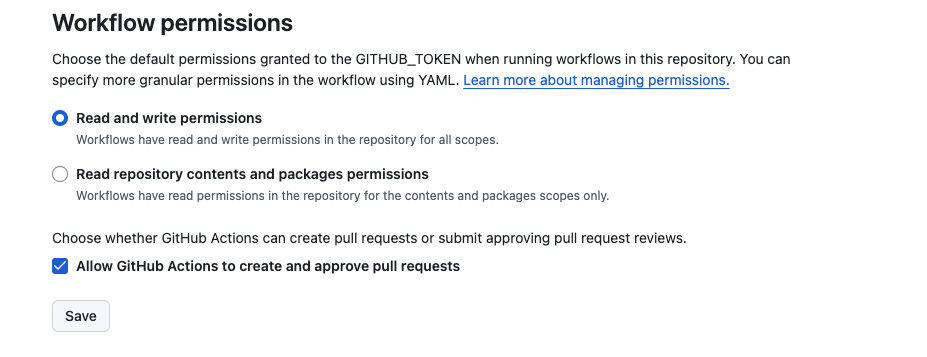
When using app_utilities, you need to grant permissions for creating branches and pull requests.
Recommended: Repository-Wide Permissions
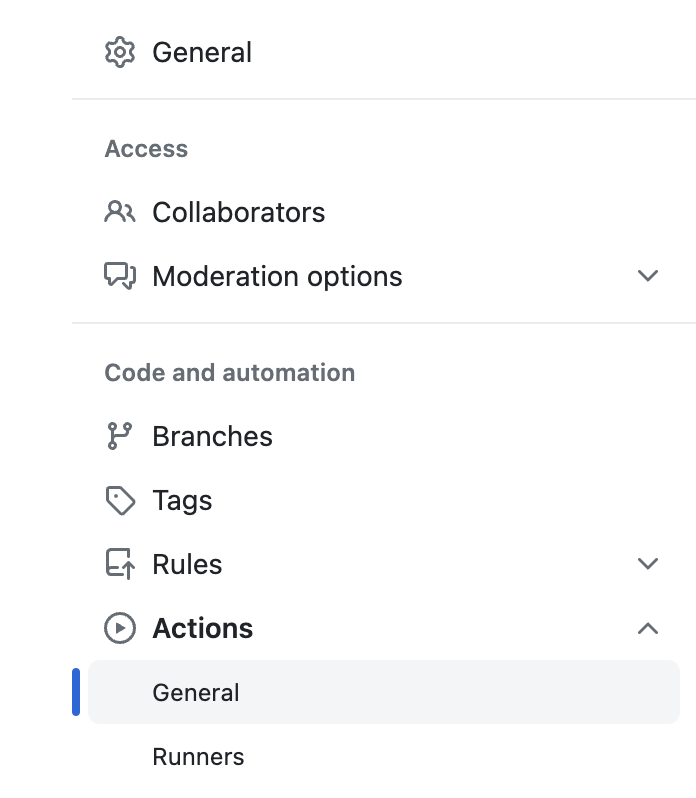
Go to Repository Settings → Actions → General
Scroll to “Workflow permissions”
Select “Read and write permissions”
Check “Allow GitHub Actions to create and approve pull requests”
Alternative: Personal Access Token (Advanced)
For cross-repo permissions or explicit token management:
Go to GitHub Settings → Developer settings → Personal access tokens
Create token with
reposcopeAdd to repository secrets as
MY_GITHUB_TOKENUse in workflow:
- uses: VatsalJagani/splunk-app-action@v6
  with:
    app_utilities: "logger"
    my_github_token: ${{ secrets.MY_GITHUB_TOKEN }}
Tip
Test your workflow on a feature branch first to ensure all permissions are correctly configured before applying to your main branch.