Troubleshooting
App-Inspect Check Failures
Authentication Issues
Failed to authenticate with Splunkbase API
Solution: Verify your Splunkbase credentials:
Ensure
splunkbase_usernameandsplunkbase_passwordare correctly set in GitHub secretsTest your credentials by logging into Splunkbase manually
Permission Issues with File Changes
App-inspect failed due to file permission issues
Solution: Enable automatic permission fixes:
- uses: VatsalJagani/splunk-app-action@v6
  with:
    to_make_permission_changes: true
⚠️ Warning: Only use this if your app doesn’t have custom executable files other than .sh, .exe, .bat, .cmd, .msi
UCC Build Issues
Missing UCC Structure
globalConfig.json not found or package folder missing
Solution:
Run
ucc-gen initlocally first to set up proper UCC structureEnsure your app has both
globalConfig.jsonandpackage/folderFollow UCC Framework documentation
User Defined Commands Issues
Commands not executing
SPLUNK_APP_ACTION_1 command not found or failed
Solution:
Ensure commands are valid Linux shell commands
Remember: commands run in your app’s root directory (not repo root)
Use proper escaping for special characters:
\\;instead of;
Utility Issues
Branch Already Exists (Non-Fast-Forward)
Error: Error in utility LoggerUtility: Cmd('git') failed due to: exit code(1)
  cmdline: git push origin splunk_app_action_b64953567a80c9580168688e7ebcca40
  stderr: 'To https://github.com/***/repo
 ! [rejected]        splunk_app_action_... -> splunk_app_action_... (non-fast-forward)
error: failed to push some refs to 'https://github.com/***/repo'
hint: Updates were rejected because the tip of your current branch is behind
hint: its remote counterpart.
Root Cause: A branch with the same hash already exists from a previous run. This happens when:
A PR is already open for the same change (no action needed)
User deleted the PR but kept the branch to prevent duplicate PRs
Solution: This is informational only - no action required from you. The action detected that an identical change already has a branch/PR. Either:
Check if a PR already exists for this change and review/merge it
If you intentionally deleted the PR, the branch prevents duplicate PRs from being created
If you want a fresh PR, manually delete the remote branch:
git push origin --delete splunk_app_action_<hash>
Permission Issues
Unable to push changes into the branch=splunk_app_action_bbe00a4a32a796cc84b73b09abc09922
OR
Error: Error in utility WhatsInsideTheAppUtility: Failed to create pull request: 401 {"message": "Bad credentials", "documentation_url": "https://docs.github.com/rest", "status": "401"}. Ensure the token has permissions and branches exist (head: splunk_app_action_be0f98789e5ab3fbb6cdb39366e9be6b, base: develop).
Root Cause: GitHub workflows don’t have permission to create pull requests.
Solution:
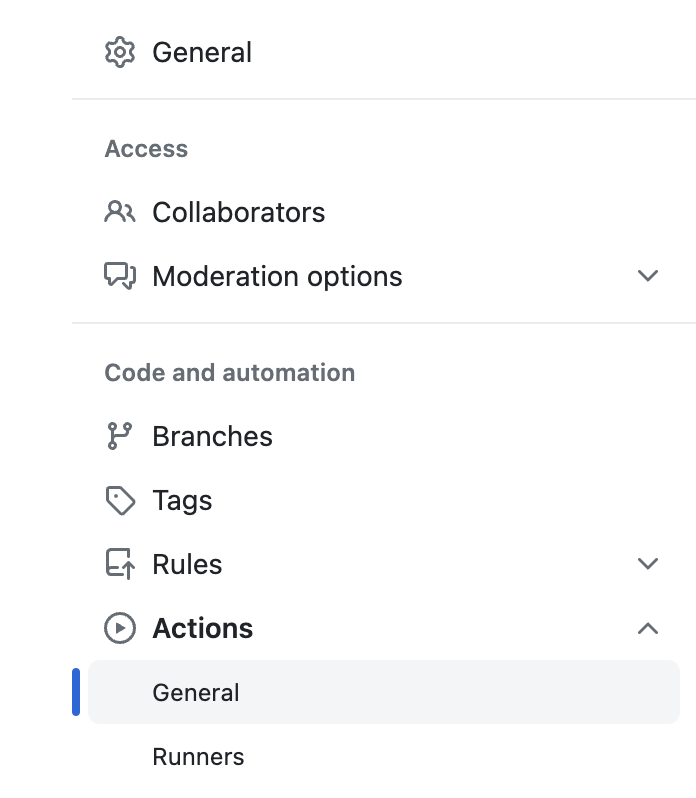
Go to your Repository
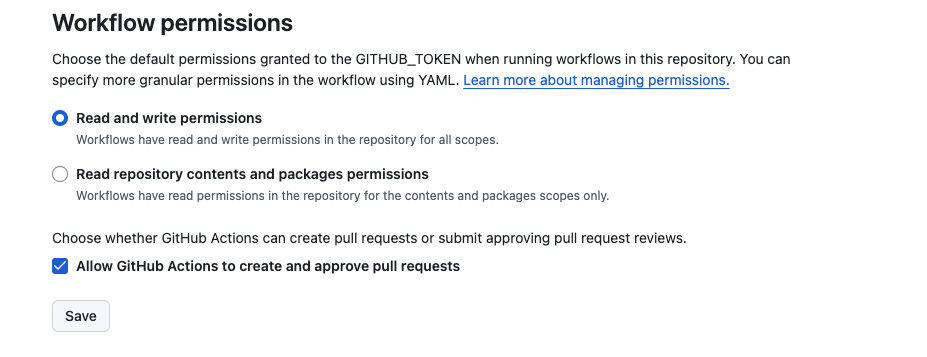
Settings>Actions>GeneralScroll down to Workflow permissions section
Select Read and write permissions
Make sure Allow GitHub Actions to create and approve pull requests is checked
Alternative: Use Personal Access Token (Not Recommended)
If you prefer explicit token management or need cross-repo permissions:
Create a Personal Access Token with
reposcopeAdd it to repository secrets as
MY_GITHUB_TOKENPass it to the action:
- uses: VatsalJagani/splunk-app-action@v6
  with:
    app_utilities: "logger"
    my_github_token: ${{ secrets.MY_GITHUB_TOKEN }}
Logger Utility Issues
logger_log_files_prefix is required
Solution: Always provide required parameters for utilities:
app_utilities: "logger"
logger_log_files_prefix: "my_app"
logger_sourcetype: "my_app:logs"  # recommended
Python Dependency Management Issues
Requirements File Not Found
Requirements file not found at: lib/requirements.txt
Solution:
Ensure the requirements file path is relative to
app_dirVerify the file exists in your repository
Check that the file name matches exactly (case-sensitive)
Dependency Installation Failures
Failed to install dependencies: pip install error
Solution:
Check requirements.txt for syntax errors
Ensure all package names are spelled correctly
Verify that packages are available on PyPI
Consider adding version constraints (e.g.,
requests>=2.31.0)
Conflicting Dependencies
ERROR: Cannot install package-a and package-b because these package versions have conflicting dependencies
Solution:
Review your requirements.txt for version conflicts
Use specific version pinning to resolve conflicts
Consider using a requirements lock file
Build Generation Issues
Missing app.conf
Missing 'version' attribute in app.conf [launcher] stanza
Solution:
Ensure
default/app.confexists in your appAdd required fields to app.conf:
[launcher]
version = 1.0.0

[id]
name = MyApp

[package]
id = my_app
Build Path Issues
Build directory not found or access denied
Solution:
Ensure your workflow checks out the repository first:
uses: actions/checkout@v5Verify the
app_dirpath is correct and relative to repository rootCheck that the directory contains a valid Splunk app structure
AppInspect Timeout Issues
Check Times Out
App-inspect check timed out after 240 seconds
Solution:
Large apps may take longer to validate
Consider using local AppInspect instead:
local_app_inspect: true
For production, the Splunkbase API is recommended despite longer wait times
Multiple Feature Conflicts
Mutually Exclusive Features Error
Error: Multiple build features detected: UCC-Gen, Python-Dependency-Management
Solution:
Only use ONE of these features at a time:
UCC-Gen (
use_ucc_gen: true)Python Dependency Management (
python_requirements_file)
Remove or disable the conflicting feature from your workflow
AppInspect Annotations
Annotations Not Appearing
AppInspect completed but no annotations visible in PR
Root Cause: Annotations only appear for files that changed in the PR, or when running on push/pull_request events.
Solution:
Annotations only show up for files modified in the current PR or push
They won’t appear on files that haven’t changed
Make sure the workflow runs on
pull_requestorpushevents:
on: [push, pull_request]
Check the “Files changed” tab in your PR to see if annotations appear on modified files
Review the workflow logs to confirm annotations were published
Check the workflow run summary for the “AppInspect Results” table
Understanding Annotations vs Job Summary
AppInspect results appear in two places:
GitHub Annotations - Inline comments on changed files showing errors/warnings at specific lines (app-inspect only)
GitHub Job Summary - Summary view in the Actions UI showing build information and all AppInspect results (app-inspect, cloud-inspect, ssai-inspect)
Annotations are published for app-inspect only. The job summary includes results from all AppInspect types.
AppInspect Fails with Authentication Error (No Credentials Provided)
Problem: The action fails with a Splunkbase API authentication error even though you didn’t explicitly enable app-inspect checks.
Cause: The is_app_inspect_check input defaults to true. If you don’t provide splunkbase_username and splunkbase_password, the API authentication will fail.
Solutions:
Provide Splunkbase credentials:
- uses: VatsalJagani/splunk-app-action@v6
  with:
    app_dir: "my_app"
    splunkbase_username: ${{ secrets.SPLUNKBASE_USERNAME }}
    splunkbase_password: ${{ secrets.SPLUNKBASE_PASSWORD }}
Disable API-based inspect and use local validation instead:
- uses: VatsalJagani/splunk-app-action@v6
  with:
    app_dir: "my_app"
    local_app_inspect: true
Disable app-inspect entirely:
- uses: VatsalJagani/splunk-app-action@v6
  with:
    app_dir: "my_app"
    is_app_inspect_check: false
Getting Help
If you encounter issues not covered here:
Check the Examples - Review the examples page for working configurations
Review Inputs - Verify your inputs against the inputs reference
Enable Debug Logging - Add this to your workflow:
env:
  ACTIONS_STEP_DEBUG: true
Search Issues - Look for similar problems in GitHub Issues
Open an Issue - If you’ve found a bug or need help, create a new issue with:
Your workflow YAML
Relevant error messages
Steps to reproduce
Expected vs actual behavior